The 7±2 Rule in Action: Simplicity Sells on the Pricing Page
ADNAN ZAMAN
Cognitive Overload is Real
“Less is more” is a cliché in design for a reason – our brains can only handle so much at once. In psychology, there’s a classic principle called Miller’s Law, often paraphrased as the magic number seven, plus or minus two. It suggests that the average person can hold about 5–9 items in their short-term memory. Beyond that, our mental circuits start to fry – we get overwhelmed, confused, and indecisive.
The simplest example of chunking is a phone number. As a long string of digits, it's hard to process—but when grouped (e.g., 555-123-4567), it becomes far easier to read and remember.
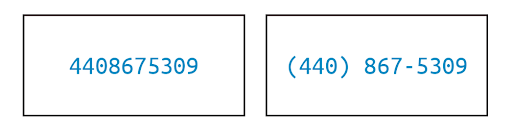
Now, think about your pricing page. How many choices, features, and pieces of information are you throwing at prospects in that one view? If it’s more than a handful, you might be triggering analysis paralysis rather than confidence.
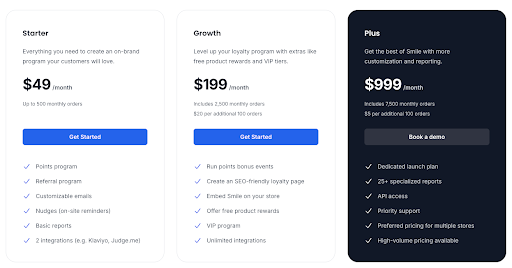
On a pricing page, the 7±2 rule translates to a simple mandate: simplify the decision space. This doesn’t mean dumbing down your offering or hiding information; it means structuring and presenting your pricing options in a digestible way…like this example by smile.io.
Too Many Pricing Tiers? You’re Losing Sales
Consider the number of pricing tiers you offer. While it’s tempting to create a plan for every possible segment (“Small, Medium, Large, XL, Enterprise, Super Enterprise…”), too many options can backfire. Prospects faced with a menu of eight different plans will likely struggle to figure out which is best for them – a phenomenon known as choice overload.

A famous study on jam sales illustrated this well: when consumers were offered 24 flavors of jam, only 3% made a purchase, but when the choice was limited to 6 jams, an astonishing 30% purchaseddigitalwellbeing.org. The takeaway? More choice can lead to less action. People feel safer choosing when the options are limited and clear.
For SaaS pricing, the sweet spot for number of plans is often around three (give or take one). There’s a reason “Good/Better/Best” tiered pricing is ubiquitous – it offers enough contrast to help different buyers find a fit, but not so much as to overwhelm. Three plans also allow you to leverage the Goldilocks effect: one tier is too basic, one too advanced, and the middle option appears “just right” for a large swath of customers.
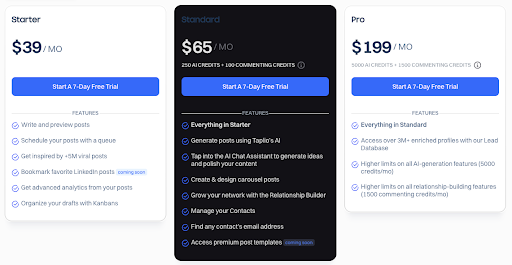
This plays to how our brains evaluate choices; with three, it’s easier to make a comparative judgment. If you currently have, say, five or six plans visible, ask if they can be consolidated or at least visually de-emphasized (for example, grouping enterprise options under an “Enterprise solutions” umbrella rather than showing 4 enterprise flavors in the main comparison table).
Forget the Feature Dump. Lead with What Matters
Beyond the number of plans, apply the 7±2 rule to features and bullets as well. It’s common to see pricing tables that list dozens of feature checkmarks under each tier, in an attempt to be thorough. The intent is good – you want to communicate everything the customer gets. But remember, a wall of checkmarks is not convincing; it’s paralyzing.
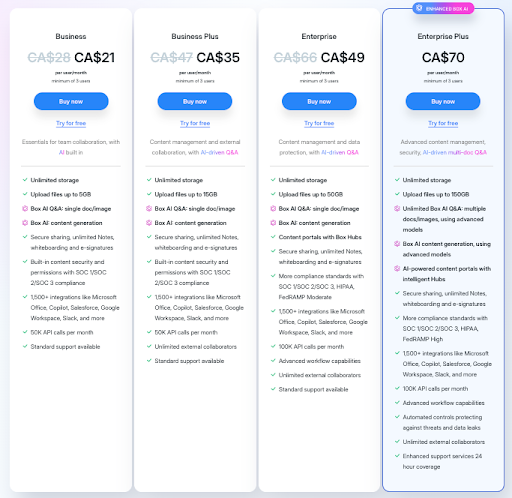
If a prospect has to scroll a mile or mentally keep track of 15–20 differences, they’ll likely give up or misinterpret something. Instead, focus on the key 5 or so benefits/features that differentiate each plan. What are the core value drivers for someone to choose Premium vs. Standard? Lead with those.
You can always include a “See all features” expandable section or a detailed spec sheet elsewhere for the few who want to dive deep. Your main pricing page should prioritize clarity over completeness. The goal is to get the prospect to identify which tier could work for them – not to answer every technical question at once.
Chunk Features into Categories for Better Clarity
Another tactic is chunking information into categories, which is essentially grouping items so each group counts as “one” in that 7±2 mental limit. For example, instead of listing 12 separate features, categorize them into 3 groups like “Collaboration Features,” “Security,” and “Support,” with a few points under each.
This way, the reader’s brain first processes 3 groups (manageable), then can drill into a group of 3–4 items (also manageable). Chunking leverages our brain’s natural tendency to remember grouped information better than a long list of unrelated points.
Design with Visual Hierarchy, Not a Spreadsheet
Let’s not forget the power of visual hierarchy in simplifying decisions. A clean, uncluttered design with clear headings, ample white space, and perhaps one highlighted “recommended” plan can do wonders to guide the eye. Netflix seems to have settled on six as its magic number. Each menu and carousel is presented on the homepage as a separate chunk, offering six options.
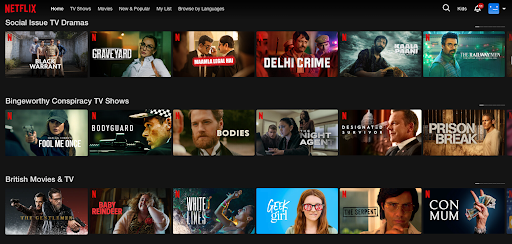
If your pricing page currently looks like a dense spreadsheet, it’s time for a makeover. Emphasize the essentials: price, plan name, top benefits. Use icons or checkmarks sparingly to indicate presence/absence of a feature – and only for features that truly matter to the decision. The rest can be footnotes or hidden until a user clicks “compare details.”
Offer Options That Don’t Overwhelm
Real-world examples abound. Most successful SaaS companies err on the side of fewer choices. Think of services like Slack or Zoom – they present a limited set of plans (with enterprise as a separate discussion, not another confusing self-serve tier).
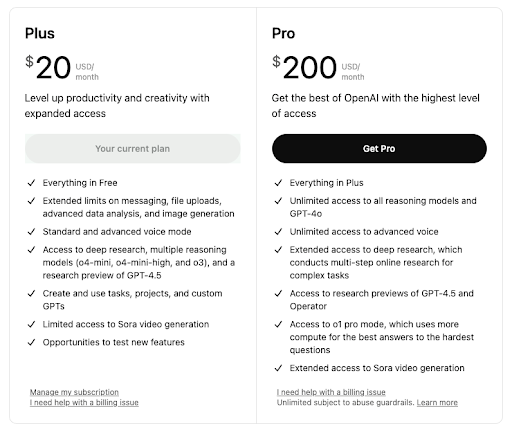
Even complex products often showcase just 2–4 main editions on their site, because they know too many options will reduce overall conversions — like ChaptGPT’s pricing page below. If you do need to offer a wide range (maybe you serve vastly different customer segments), consider a plan selector wizard: ask a couple of questions and then recommend a plan, rather than forcing the user to self-serve from a litany of choices.
Help Buyers Choose with Confidence
In action, the 7±2 rule is about empathy: put yourself in your buyer’s shoes. When they arrive at your pricing page, they’re asking, “Which of these options is right for me? And what am I getting?” Give them a straightforward path to the answer. By simplifying and structuring your pricing information, you’ll not only make the experience less stressful, you’ll also instill confidence. A prospect who isn’t overwhelmed is more likely to click “Buy” with conviction.

Summary
Don’t confuse your buyers with too much choice or information. Every additional option or line on your pricing page should earn its place by delivering clear value to the evaluation process. If it doesn’t, consider removing or consolidating it. In the quest for transparency, it’s possible to go overboard and create cognitive chaos. The best pricing pages find that sweet spot of informative yet concise, giving prospects just enough to say “aha, I see which plan works for me,” and nothing more. Remember, simplicity sells – and it also delights.
Want some personalized feedback on your pricing page?
I offer free 15-minute sessions, with zero sales pitches, just practical insights. I want you to walk away with at least one clear, actionable idea you can immediately apply. Interested? Just reply to this email and we’ll set it up.
